
Download DreamStudio – AI‑Powered Image Generation Tool, Free & Secure
Overview: Effortless AI Image Creation with DreamStudio
DreamStudio is a web‑based, AI‑driven graphics platform that transforms plain text prompts into vivid, high‑resolution images in a matter of seconds. Powered by the latest diffusion models, the service eliminates the need for expensive design software, drawing tablets, or years of artistic training. Instead, users simply type a description—such as “a serene mountain lake at sunrise, photorealistic”—and the engine renders multiple visual variations that can be instantly downloaded, upscaled, or refined. This ease of use makes DreamStudio an ideal solution for marketers crafting campaign visuals, writers visualizing story settings, educators preparing teaching materials, or hobbyists exploring creative ideas without a steep learning curve.
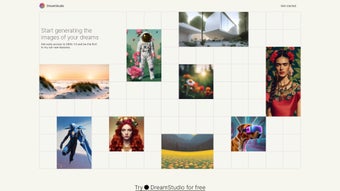
The user interface is intentionally minimalist. After a quick sign‑up, the dashboard presents a single input field, a handful of style presets, and sliders for resolution and intensity. Once the “Generate” button is pressed, the cloud‑based AI runs through a series of inference steps, delivering a grid of four initial thumbnails. Users can hover to enlarge, click to upscale, or hit “Regenerate” with slight prompt tweaks for faster iteration. The platform also includes a community gallery where creators can browse public works, remix ideas, and draw inspiration from trending styles.
Despite its strengths, DreamStudio has a few constraints. Because all processing occurs on remote servers, a stable internet connection is mandatory, and there is no offline desktop client. Advanced users looking to fine‑tune diffusion schedules or upload custom training data will find those options hidden behind a developer‑only API. Nonetheless, for the vast majority of creative workflows that demand rapid prototyping and cost‑effective image generation, DreamStudio delivers a secure, reliable, and surprisingly powerful experience.
Key Features That Differentiate DreamStudio
- Text‑to‑Image Generation: Instantly convert natural‑language prompts into high‑quality visuals.
- Style Presets: Choose from curated artistic styles (Cinematic, Illustrative, Retro, etc.) to alter mood and aesthetic.
- Resolution Control: Generate images from 512 × 512 up to 2048 × 2048 px, with one‑click upscaling.
- Real‑Time Preview: Live progress bar and low‑res thumbnails let you assess results before full rendering.
- Batch Generation: Submit up to five prompts simultaneously, perfect for mood‑board creation.
- Secure Cloud Processing: All data is encrypted in transit; no files are stored without explicit user consent.
- Free Tier & Pay‑As‑You‑Go: Start with complimentary credits; purchase additional credits at transparent rates.
- RESTful API Access: Developers can embed image generation into apps, automate workflows, or integrate with design pipelines.
- Community Gallery & Remix: Browse publicly shared creations, remix them, or use them as inspiration for new prompts.
- Multi‑Platform Responsiveness: Fully functional on desktops, tablets, and smartphones across major browsers.
These capabilities are thoughtfully bundled to keep the experience smooth. For instance, “Batch Generation” eliminates repetitive page reloads, saving both bandwidth and time for teams working on large visual catalogs. Meanwhile, the “API Access” opens doors for SaaS platforms that want AI‑generated graphics without building their own model from scratch. The combination of a zero‑cost entry point and a clear credit‑based pricing structure makes DreamStudio a low‑risk experiment for freelancers, agencies, and educational institutions alike.
Beyond the headline features, DreamStudio also offers nuanced tools such as prompt history tracking, automatic watermark removal for paid users, and a “safe mode” that filters out potentially inappropriate content. These subtle yet valuable additions contribute to a polished, professional workflow that feels both modern and trustworthy.
Installation, Compatibility, and Getting Started in Minutes
Because DreamStudio lives entirely in the cloud, there is no traditional installation process. All you need is a modern web browser (Chrome, Firefox, Edge, or Safari) and an active internet connection. Follow these steps to begin generating images right away:
- Create an Account: Visit dreamstudio.ai, click “Sign Up,” and register via email or Google/Apple SSO. After email verification, you receive a starter credit bundle for free.
- Select a Plan (Optional): If you anticipate heavy usage, upgrade to a paid credit package from the “Billing” page. Pricing is displayed per 1,000 credits in USD, with credits deducted based on image resolution and style.
- Familiarize with the Dashboard: The main screen shows a prompt box, style selector, resolution slider, and a “Generate” button. Below, a history panel logs recent creations for quick re‑download.
- Enter a Prompt: Type a clear description, e.g., “A futuristic city skyline at sunset, hyper‑realistic, 8k.” The more specific you are, the better the AI interprets your vision.
- Choose a Style (Optional): Pick “Cinematic” for dramatic lighting, “Illustrative” for a hand‑drawn feel, or leave blank for a neutral output.
- Adjust Settings: Use the resolution slider to match your needs—1024 × 1024 px for social media, 2048 × 2048 px for print.
- Generate & Review: Click “Generate.” Within seconds, a grid of four variations appears. Hover over any thumbnail for a larger preview.
- Refine or Download: If a result is close but not perfect, click “Regenerate” with the same prompt or tweak the text. When satisfied, hit “Download” to save the PNG or JPEG file.
DreamStudio runs on all major operating systems—Windows 10/11, macOS, Linux (via browser), as well as mobile platforms (iOS 14+/Android 9+) because it is fully responsive. The only technical requirement is a stable internet connection; server‑side scaling ensures fast response times even on modest devices.
Power users can take advantage of the RESTful API, which provides cURL examples and SDKs for Python, JavaScript, and Ruby. Authentication uses an API key found in your account settings, and each request consumes credits according to the requested image size. This makes DreamStudio not only a handy design tool for individuals but also a scalable service for teams integrating AI‑generated graphics into newsletters, product mockups, or game assets.
Pros, Cons, Frequently Asked Questions, and Final Verdict
Pros
- Intuitive, browser‑based interface—no software download required.
- Fast generation speed; most images render in under 10 seconds.
- Free starter credits make it risk‑free for new users.
- Wide range of style presets and resolution options.
- Secure, encrypted cloud processing protects user data.
- RESTful API enables automation and integration into other workflows.
- Responsive design works seamlessly on Windows, macOS, Linux, iOS, and Android.
- Community gallery encourages inspiration and collaboration.
Cons
- Requires an active internet connection; no offline mode.
- Limited deep customization of the underlying AI model.
- Credit‑based pricing can become costly for high‑volume commercial projects.
- Advanced users may miss granular control over diffusion parameters.
- Occasional minor artifacts may need post‑editing.
Is DreamStudio really free to use?
Yes. New users receive a complimentary credit bundle that allows several image generations at no cost. When the free credits run out, you can purchase additional credits on a pay‑as‑you‑go basis.
Can I use DreamStudio for commercial projects?
Absolutely. Once you have generated an image, you own the rights to use it commercially, provided you comply with DreamStudio’s licensing terms (no resale of the raw AI model).
What browsers are supported?
DreamStudio works on the latest versions of Chrome, Firefox, Edge, and Safari. Mobile browsers on iOS and Android are also fully supported.
How secure is my data during image generation?
All communications are encrypted via HTTPS, and images are processed on secure cloud servers. DreamStudio does not store your prompts or generated images beyond the session unless you choose to save them in your personal gallery.
Is there an API for developers?
Yes. DreamStudio offers a RESTful API with detailed documentation, allowing you to generate images programmatically, manage credits, and retrieve results directly into your applications.
Conclusion – Why You Should Download DreamStudio Today
DreamStudio strikes an excellent balance between accessibility and advanced AI capabilities. Whether you are a marketer needing eye‑catching visuals, a writer visualizing a scene, or a developer embedding image generation into an app, the platform provides a fast, secure, and affordable solution. Its browser‑only architecture eliminates the hassle of installations, while the generous free tier lets you test the waters without commitment. Though the lack of offline mode and deeper model customization may be a drawback for niche power users, the overall experience—smooth UI, reliable cloud processing, and transparent credit pricing—makes DreamStudio a compelling choice for anyone eager to explore AI‑driven creativity.
Ready to unleash your imagination? Download DreamStudio now, claim your free credits, and start turning words into stunning images in seconds.
Overall, DreamStudio delivers on its promise of effortless image generation. The balance between ease of use and powerful AI capabilities makes it a standout choice for creators who need quick visual assets without diving into complex software. While power users might crave more model‑tuning options, the platform’s strengths—speed, accessibility, and a generous free tier—outweigh its drawbacks for the majority of creative workflows.



.png)



